


Shudder: Horror & Thrillers
3.26.74K Reviews
App Specs
- Version
- Varies with Device
- Updated On
- License
- Free
- Downloads
- 1,000,000+
- Developer
- AMC Global Media Inc.
- Categories
- Entertainment
- Platform
- Android
Screenshots
 Analysis by AppCompare
I like having a horror service to turn to when I want something darker than the usual streaming mix, but a dedicated catalogue only helps if it fits the way I watch. Shudder is an entertainment app from Digital Store LLC, built around horror and thrillers rather than a broad selection of genres. I’d consider it most useful for viewers who already seek out scary films, curious independent titles, and genre series—not for someone who mainly wants a little horror tucked into a general-purpose service.
What to expect when you open it
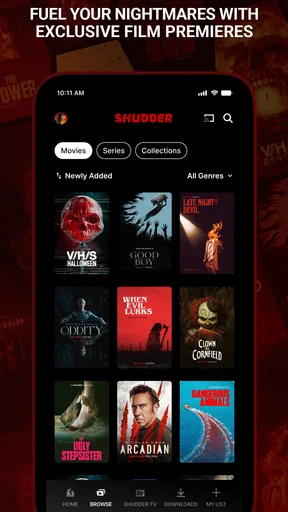
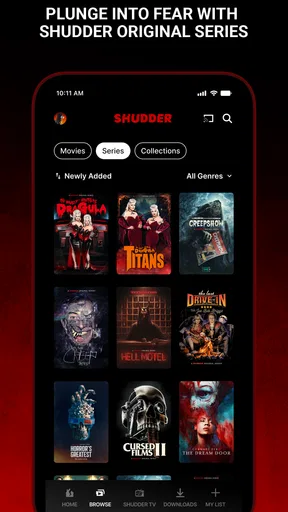
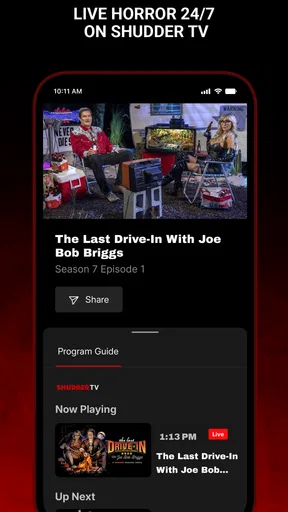
The app’s focus makes choosing a film feel different from scrolling through a general streaming catalogue. Instead of treating horror as one small shelf, it gives the genre room to lead. The original article describes a dark interface and categories such as collections, series, and new releases; that kind of organization is helpful when I know the mood I want but not the title. Collections can also act as a low-effort starting point when I’m open to discovery but don’t want to sift through every option.
There is a useful trade-off here: a dedicated service can make it easier to stay inside a genre, but it is less convenient when the people watching with you want comedy, family films, or a completely different kind of evening. I’d use Shudder when horror is the plan, rather than expecting it to replace a broad streaming library.
Speed expectations and a practical viewing routine
For a streaming app, speed matters most at the moments when I’m trying to settle in: opening the app, finding a title, and getting playback underway. The published account of the experience describes smooth streaming and no buffering on one older phone, which is encouraging, but it is still one person’s experience rather than a guarantee for every connection or device. I’d judge performance on my own network before planning a long watch around it.
A realistic use case is a quiet evening when I have time for one film, not an entire catalogue tour. I’d browse collections before pressing play, pick a title that suits the group’s tolerance for intensity, and avoid spending the first half of the evening debating what to watch. If I’m watching alone after work, a series can make sense; if friends are over, a film is usually easier to agree on and finish in one sitting.
One practical tip is to make the choice before a commute or other period without dependable internet. The original review says downloads are available for offline viewing, so downloading ahead can be more reliable than assuming a stream will work everywhere. I would check that the selected title is ready while still connected, rather than waiting until I’m already on the train or away from home.
Heavy-use moments and discovery
Long viewing sessions are where a focused catalogue can be especially appealing: it’s easy to move from a film to a series without changing services or switching to a different genre. The original reviewer enjoyed a weekend of watching, but heavy use also makes it worth thinking about attention and choice. A large selection is not automatically a better evening if I keep browsing instead of watching, so collections are most useful when I treat them as a shortlist rather than a reason to inspect everything.
Worth Reading Before You Choose

EA SPORTS FC Mobile 26 Is a Bigger Football Game, but It Takes Time

Flipboard Shows What News Apps Must Do Beyond the Feed

Switching to Android Auto Means Rethinking Your Driving Routine

Google Calendar Makes a Crowded Week Easier to Manage

Ludo King Makes the Most of the Minutes Between Plans

Baby Panda World Brings Quick Play to Modern Phones, but Its Game Library Feels Busy
The same applies to independent films. Their unfamiliarity can be a strength when I want something less predictable, but it also means I may not know whether a title fits my taste from its name alone. I’d use the app’s community ratings and comments as a rough second opinion, not as a substitute for deciding what kind of horror I’m in the mood for. A polarizing film might be exactly right for a curious night and a poor pick for a group that wants a safe crowd-pleaser.
That makes the service a better match for exploration than for guaranteed consensus. If I’m choosing with someone who dislikes gore, supernatural stories, or slow-burn tension, I’d talk through those preferences first. The horror label covers very different experiences, and the convenience of a genre-focused app doesn’t remove the need to pick carefully.
Reliability, recovery, and device limits
The original account reports smooth playback on a not-so-new phone, which suggests the app can be comfortable to use on older hardware in at least some circumstances. I wouldn’t turn that into a promise about every handset, operating-system version, or home network. Streaming depends on the connection and device as well as the app, so if playback stalls, I’d first check the network and try again before assuming the title or service itself is at fault.
Offline viewing is a helpful fallback for weak connections, though it works best as preparation rather than rescue: download while the connection is stable and confirm the title is available before leaving. For a shared living-room screen, the original review mentions access on other devices, including smart TVs and gaming consoles. That can make a larger screen more appealing, but anyone deciding mainly on TV use should check that their particular device supports the service before relying on that setup.
On a phone, a long film can also be a different experience from a quick browse. I’d think about battery, screen size, and whether I can watch without interruptions before starting something I want to finish. The app’s horror focus may suit headphones and a dark room, but that atmosphere is not worth much if the device is uncomfortable to hold for the length of a feature.
Who it suits, and where alternatives win
I’d recommend Shudder to horror fans who want a place where the genre is the main event, especially people willing to try independent films and series alongside familiar types of scares. It can also work for someone exploring horror gradually: choosing a collection or reading community reactions may feel less daunting than picking blindly from a general catalogue.
I’d skip it as my only streaming subscription if my household watches a wide mix of genres or needs one service to satisfy everyone. A general entertainment platform is the more practical alternative for variety, while a free video service may suit viewers who are comfortable searching across scattered sources instead of using a dedicated catalogue. The choice is less about which format is universally better and more about whether horror is a regular viewing habit or an occasional impulse.
Price is another reason to be deliberate. The app is free to install, but it includes in-app purchases listed from $4.99 to $89.99 per item, so I would check the purchase terms shown in the app before committing to anything. I wouldn’t assume that installing it means every title is free to watch. The app is rated Teen, a useful reminder for families to consider content suitability rather than treating the service’s genre focus as a guarantee that every selection is appropriate for every teenager.
Shudder has an average rating of 3.2 from around 17,000 ratings, alongside about 6,700 written reviews and more than a million installs. I take those figures as context, not a verdict: a rating can reflect many different devices, expectations, and viewing habits. The most relevant question is still whether its focused horror selection matches what I want to watch often enough to justify using a dedicated service.
If I were trying it for the first time, I’d start with one title that clearly fits my taste, test playback on the device I expect to use most, and explore collections only after I know the viewing experience works for me. That gives me a better sense of the catalogue and performance than installing it, browsing endlessly, and judging it without watching anything.
If you’re anything like me, you love a good scare now and then. Sometimes, it’s a gripping thriller, and other times, a horror flick that makes you jump out of your seat. That’s why I was pretty stoked to try out Shudder: Horror & Thrillers. I’ve heard a lot about this app, so I decided to dive in and see if it lives up to the hype.
First Impressions and Interface
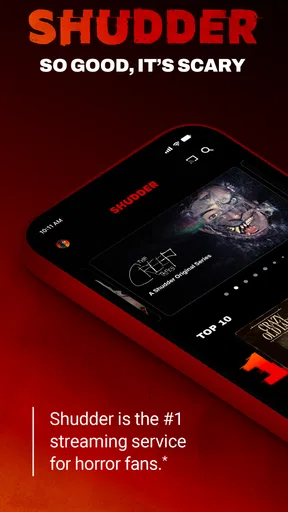
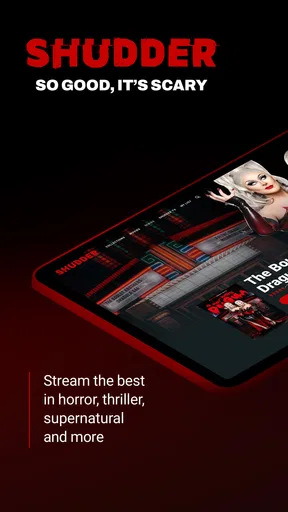
From the moment you fire up Shudder, you’re greeted with a sleek, dark-themed interface that sets the mood right away. It’s got a vibe, you know? The layout is pretty intuitive, which is always a win in my book. You don’t have to be a tech wizard to navigate this app. The main menu offers straightforward categories like “Collections,” “Series,” and “New Releases,” which makes it easy to find what you’re in the mood for.
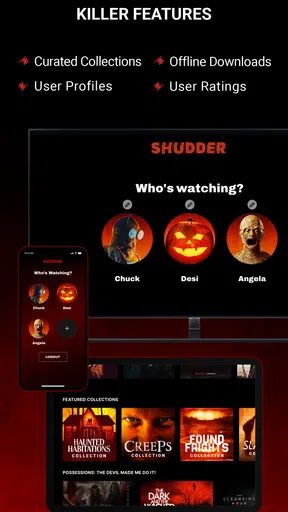
One of the coolest features is the “Collections” section. It's like having a horror buff best friend who curates everything for you. Whether you’re into classic horrors or indie thrillers, there’s a collection waiting for you. This section really helped me discover some hidden gems I probably wouldn’t have stumbled upon otherwise.
Content Variety
Now, let’s talk about what really matters—the content. You’ve got everything from spine-chilling classics to the latest bone-chilling originals. I was pleasantly surprised by the extensive library. It’s not just movies either; there are some fantastic series on there that will keep you hooked for hours. I spent an entire weekend binge-watching, and I regret nothing!
One thing I particularly enjoyed was the range of indie films available. Sometimes, the best scares come from the most unexpected places. The app really champions indie creators, and you can see that in the quality and uniqueness of the films offered.
User Experience
As much as I love the content, a poor user experience can totally ruin an app for me. Thankfully, Shudder doesn’t disappoint. Streaming is smooth, and the video quality is top-notch—even on my not-so-new phone. I didn’t experience any buffering, which is a huge plus. The app also lets you download titles for offline viewing, which is perfect for those long commutes or when I’m hiding under the covers with my tablet.
There’s also this nifty feature where you can rate movies and leave comments, so it feels like a mini community of horror enthusiasts. It’s always fun to see what others think about a movie before diving in.
Pricing and Availability
Alright, let’s talk money. Shudder offers a free trial, which I definitely took advantage of. After that, it’s a monthly subscription, and honestly, it’s pretty reasonable for the amount of content you get. It’s available on both Android and iOS, so no one’s left out. You can also access it on other devices like smart TVs and gaming consoles, which is super convenient if you prefer a larger screen experience.
The subscription gives you unlimited access to all the movies and series, so if you’re a horror fanatic like me, it’s worth every penny. Plus, they’re always updating the library, so there’s always something new to watch.
Final Thoughts
In a world full of streaming options, Shudder: Horror & Thrillers stands out for its niche focus and quality content. Whether you’re a die-hard horror fan or someone just dipping their toes into the genre, this app has something for you. From the user-friendly interface to the diverse library, it’s clear that Shudder knows what its audience wants.
So, if you’re looking to spice up your movie nights or simply want to explore the world of horror and thrillers, I’d definitely recommend giving Shudder a shot. Who knows, you might just discover your new favorite scare!
Pros
- Extensive horror movie library.
- High-quality streaming options.
- User-friendly interface.
- Regularly updated content.
- Exclusive original series.
Cons
- Limited to horror genre only.
- Requires subscription to access.
- Regional content restrictions.
- App occasionally crashes.
- No offline viewing option.
FAQs for Shudder: Horror & Thrillers
What is Shudder and what content does it offer?
Shudder is a premium streaming service specializing in horror, thriller, and supernatural genres. It provides a vast library of movies, series, and exclusive Shudder Originals. The content ranges from classic horror films to contemporary thrillers and indie gems, catering to fans of spine-chilling entertainment.
Is Shudder available on multiple devices?
Yes, Shudder is accessible on a variety of devices. You can stream content on smartphones, tablets, smart TVs, and web browsers. The app is available for both Android and iOS, ensuring you can enjoy your favorite horror content on the go or from the comfort of your home.
Does Shudder offer a free trial for new users?
Shudder typically offers a 7-day free trial for new users, allowing you to explore the platform without commitment. During this period, you can access the full range of movies and shows. If you decide to continue, you can choose between a monthly or annual subscription.
How frequently is new content added to Shudder?
Shudder regularly updates its library with new content, including weekly additions of films and series. The platform also releases exclusive Shudder Originals and curated collections to keep subscribers engaged with fresh and unique horror and thriller experiences.
Can I download content for offline viewing on Shudder?
As of now, Shudder does not support downloading content for offline viewing. Subscribers need an active internet connection to stream movies and shows. This feature may be considered in future updates to enhance user convenience.


